
Electron vs. Native Desktop: Is the Speed Trade-Off Worth It?
Every software product team eventually faces a familiar fork in the road: you have validated your core idea, your web application is gaining traction, and stakeholders agree that a dedicated desktop application is the logical next step. Then comes the critical architectural decision. Do you invest in cross-platform desktop app development using a framework that lets you ship a unified codebase to Windows, macOS, and Linux in weeks? Or do you commit the time, budget, and specialized engineering talent required to build separate, high-performance native applications for each operating system?
This choice is rarely just about technical preference. It directly impacts your time to market, engineering headcount, cloud infrastructure costs, user retention, and long-term product roadmap. Choosing the best framework for desktop app development requires balancing development velocity against runtime efficiency. Understanding the real-world trade-offs between Electron vs native desktop architectures helps engineering leaders and startup founders make informed decisions that align technical capabilities with business goals.
Electron vs. Native Desktop: What Actually Changes Under the Hood?
To evaluate performance and development trade-offs objectively, it helps to examine how each architectural model operates at the system level.
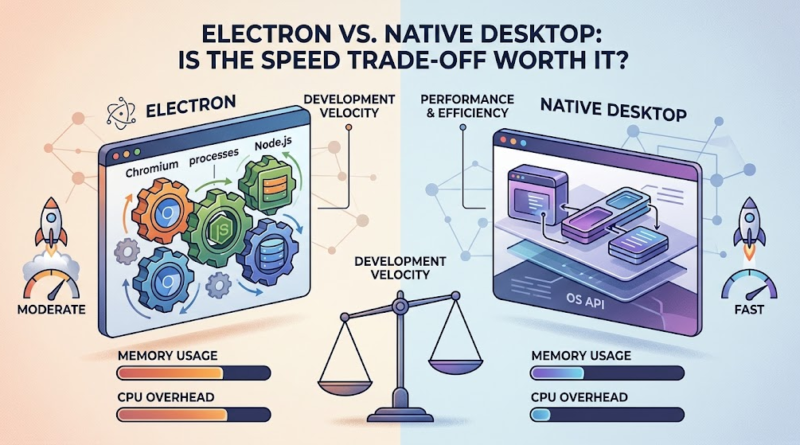
Electron bridges web technologies and operating-system desktop environments by bundling a Chromium rendering engine with a Node.js runtime. When you launch an Electron application, you are essentially running a localized, headless instance of Google Chrome alongside a backend Node.js process. Your user interface is rendered using HTML, CSS, and JavaScript inside web views, while Node.js handles file system access, native OS notifications, and local process management through an inter-process communication (IPC) bridge.
In contrast, native desktop development relies directly on platform-specific toolkits, compilers, and APIs provided by the operating system vendor. For macOS, this typically involves Swift, Objective-C, and AppKit or SwiftUI. For Windows, developers utilize C#, C++, WinUI, or the .NET ecosystem. Linux native applications rely on diverse toolkits such as GTK or Qt. Because native code compiles directly to machine instructions and communicates straight with OS graphics and windowing subsystems, it bypasses the abstraction layers inherent in web-based runtimes.
This fundamental architectural difference dictates how applications interact with hardware, consume system resources, and manage cross-platform compatibility. While native development is not a monolith—since modern cross-platform native-oriented frameworks introduce their own nuances—the distinction between a web-runtime wrapper and a platform-compiled binary remains the defining baseline for desktop engineering.
Speed, Memory, and Responsiveness: Where Native Apps Win
Performance discussions in desktop software often generate polarized debates. To cut through the noise, it is essential to analyze performance across specific operational vectors:
-
Application Startup Time: Native apps generally launch faster because their binaries load directly into memory without initializing a browser runtime or spawning secondary helper processes.
-
Memory Consumption: Electron app performance is heavily influenced by its Chromium foundation. Because each window or plugin can run in its own process, memory footprints frequently start at 100MB to 300MB of RAM even at idle, contrasting sharply with lightweight native utilities.
-
CPU and GPU Usage: Heavy graphic rendering, animations, or data visualization run efficiently in modern Chromium engines, but demanding computations or background processing can experience higher overhead in JavaScript-based environments compared to compiled C++ or Rust modules.
-
UI Responsiveness: A well-optimized Electron application can feel indistinguishable from a native app during standard CRUD operations, but deep system-level scrolling and gesture responsiveness often favor native implementations.
-
Access to OS Features: While modern web APIs and native node modules bridge many gaps, novel operating system APIs, specialized hardware drivers, and low-level system integrations are inherently faster and more direct in native development environments.
| Evaluation Dimension | Electron Applications | Native Desktop Applications |
| Memory Footprint | Higher (Bundles Chromium and Node.js runtimes) | Lower (Optimized system resource utilization) |
| Startup Speed | Moderate to Fast (Requires runtime initialization) | Fast (Direct execution of compiled binaries) |
| Development Speed | High (Single codebase for Windows, Mac, Linux) | Lower (Separate codebases per platform) |
| Cross-Platform Support | Out-of-the-box multi-platform delivery | Requires distinct codebases and platform expertise |
| Platform Integration | Good via bridge APIs; occasional UI consistency gaps | Deep, seamless integration with OS design guidelines |
| Long-Term Maintenance | Streamlined through unified web stack updates | Complex due to multi-language and multi-framework upkeep |
It is crucial to qualify these comparisons. A poorly optimized native application burdened by memory leaks and bloated libraries can easily underperform a streamlined, tightly tuned Electron application. Conversely, when comparing well-crafted applications in both categories, native desktop app performance retains a definitive edge in raw resource efficiency.
Why Electron Remains a Smart Choice for Cross-Platform Products
Despite valid criticisms regarding resource utilization, Electron powers some of the world’s most successful software products, including Visual Studio Code, Slack, Discord, and Notion. For many businesses, the engineering and economic benefits far outweigh the runtime overhead.
The primary driver is development velocity. Maintaining a single codebase that targets Windows, macOS, and Linux simultaneously eliminates the need to hire siloed teams of Swift, C#, and Linux UI developers. Organizations can leverage existing JavaScript, TypeScript, React, Vue, or Angular talent. Teams that already maintain a sophisticated web application can port their core logic, components, and state management directly into a desktop wrapper with minimal refactoring.
Furthermore, Electron vs native development cost analyses frequently favor Electron for early-stage startups and MVPs. Reducing duplicated engineering effort shortens time to market, accelerates feature iteration based on user feedback, and simplifies continuous deployment pipelines. For collaboration tools, productivity suites, content management utilities, and developer tools where human interaction speed is the primary bottleneck rather than raw CPU rendering, Electron offers an exceptionally practical engineering compromise.
The Hidden Costs of Performance: Development Time, Maintenance, and Scaling
Evaluating technology purely on runtime metrics creates a blind spot. Total Cost of Ownership (TCO) encompasses initial engineering outlay, team scaling, long-term maintenance, and infrastructure scaling.
When assessing Electron vs native development cost, consider the hidden multipliers:
-
Engineering Hiring & Retention: Finding versatile full-stack web developers is significantly faster and more cost-effective than assembling specialized teams for three distinct native operating system stacks.
-
Codebase Maintenance: Fixing a bug or shipping a feature in an Electron app happens once. In native multi-platform environments, the same feature must be designed, implemented, and tested independently in Swift, C#, and Linux-compatible toolkits.
-
Dependency and Security Management: Electron applications bundle their runtime, meaning your team is responsible for patching upstream Chromium and Node.js security vulnerabilities independently of the user’s operating system.
-
Distribution and Auto-Updates: Packaging, code-signing, and distributing updates across platforms require robust CI/CD pipelines regardless of stack, but managing native installers adds another layer of complexity.
Consider a hypothetical mid-sized product team building a project management workspace. Choosing native development requires hiring three platform-specific squads, tripling feature-parity release cycles, and multiplying QA overhead. Choosing Electron allows a unified web product team to ship updates across all operating systems simultaneously, dedicating saved capital to core product innovation rather than platform plumbing.
Electron or Native? A Practical Framework for Choosing the Right Stack
Making the right architectural choice requires mapping your product requirements against objective operational constraints.
When Electron is the Right Fit
-
Your product must launch simultaneously across Windows, macOS, and Linux with limited engineering headcount.
-
The user interface is primarily document- or application-style UI rather than highly specialized native gesture interaction.
-
Your development team possesses strong web technology expertise (JavaScript/TypeScript, React, CSS).
-
Speed to market, rapid feature iteration, and synchronized web-desktop product parity are strategic priorities.
-
Expected resource consumption (RAM/CPU) is well within the threshold of modern developer and enterprise hardware.
When Native Development is the Right Fit
-
Low latency, real-time audio/video processing, or strict resource constraints are central to your value proposition.
-
The application performs sustained CPU-, GPU-, or hardware-intensive workloads (e.g., 3D modeling, high-FPS gaming, heavy video transcoding).
-
Deep operating-system integration, custom window management, and specialized hardware hooks are mandatory.
-
Platform-specific accessibility compliance and native UX fidelity represent key brand differentiators.
Frequently Asked Questions
Is Electron slower than native desktop application development?
In terms of runtime performance, yes, native applications generally enjoy advantages in startup speed, memory efficiency, and raw execution speed due to direct compilation and lower abstraction overhead. However, in terms of development speed, Electron is drastically faster, allowing teams to ship cross-platform products in a fraction of the time.
When should a business choose Electron over a native desktop app?
A business should choose Electron when cross-platform reach, development cost efficiency, and team skill set alignment outweigh the need for bare-metal performance optimization. It is ideal for SaaS desktop wrappers, enterprise productivity tools, and collaborative applications where web technologies already drive the core experience.
Conclusion and Call to Action
The debate between Electron and native desktop architecture is not about finding a universal winner; it is about matching engineering trade-offs to your product’s unique operational reality. While native development delivers unmatched resource efficiency and platform integration, Electron provides unbeatable cross-platform agility, ecosystem leverage, and cost-effective time-to-market.
Evaluating your product requirements, target user hardware, team expertise, and long-term scaling roadmap ensures your technology stack supports your business objectives rather than hindering them.
Are you evaluating desktop application architectures or planning a new cross-platform product rollout? Partner with our experienced software engineering team to analyze your product requirements, evaluate performance trade-offs, and design a scalable desktop strategy tailored to your business goals.
