
Why Apps Fail After Launch (And How to Fix It)
A business spends months refining a product vision, allocating hundreds of thousands of dollars to design and development, and building anticipation for launch day. The big day arrives, press coverage rolls in, initial marketing campaigns pay off, and download numbers spike. Then, within three weeks, the dashboard goes quiet. Daily active users plummet, push notifications are ignored, and new accounts sit dormant.
This scenario plays out constantly across the software industry. The hard reality is that acquiring downloads is only the first hurdle in building a digital product. Understanding why apps fail after launch requires looking past top-of-funnel interest and examining what happens when real users interact with your software. App abandonment usually isn’t caused by a single fatal flaw; it stems from an accumulation of onboarding friction, hidden technical debt, confusing navigation, and an unfulfilled value proposition.
If your digital product is struggling to convert early interest into sustainable daily usage, the solution isn’t necessarily a multi-million-dollar redesign. By systematically addressing product quality, user experience, and post-launch analytics, software teams can bridge the gap between initial downloads and long-term product adoption.
The Launch-Day Illusion: Why Downloads Don’t Equal Success
Launch day metrics are notoriously deceptive. High download counts, social media buzz, and sudden sign-up spikes feel like validation, but they only measure interest, not product utility.
To build a product that survives long-term, product leaders must distinguish between five key stages of the product lifecycle:
-
Acquisition: A user sees an ad, listing, or article and downloads the app.
-
Activation: The user opens the product and completes a foundational setup task.
-
Engagement: The user interacts with key features and experiences core value.
-
Retention: The user routinely returns to perform actions over time.
-
Monetization: The user converts into a paying customer or active business account.
When companies treat acquisition as the primary success metric, they confuse reach with retention. Consider a business management platform that offers a 14-day free trial. If 1,000 users download the app but 900 leave during account setup because input forms are too complex, the campaign generated strong interest but zero business value.
Retention is the single definitive measure of product-market fit. An app with modest acquisition numbers and strong, compounding retention will consistently outperform a heavily marketed app suffering from high churn. Without a reason for users to return, a product is simply burning through marketing capital.
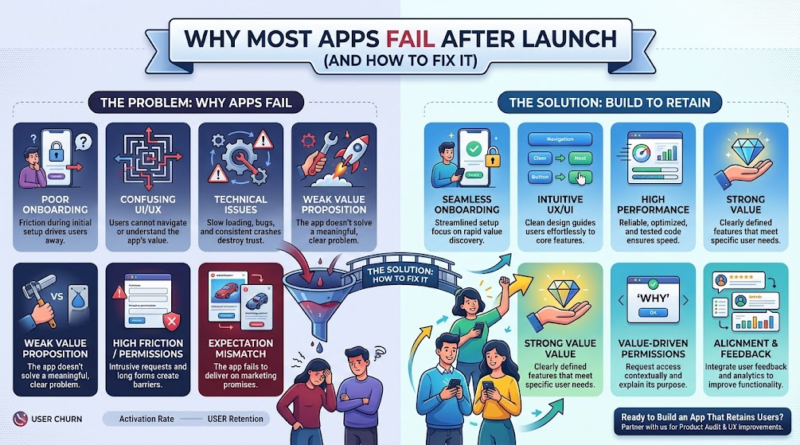
7 Reasons Users Abandon Apps After Downloading Them
Why do users abandon mobile apps after downloading them? While every product category presents unique challenges, early drop-off typically traces back to seven core root causes.
       [ Downloads / Acquisition ]
                   │
                   ▼
  ┌─────────────────────────────────┐
  │  1. Unclear Onboarding          │
  │  2. Frustrating UX / UI         │
  │  3. Performance / Bugs          │ ──► [ User Churn / Abandonment ]
  │  4. Weak Value Proposition      │
  │  5. High Friction / Permissions │
  │  6. Expectation Mismatch        │
  │  7. Stale Product / Support     │
  └─────────────────────────────────┘
                   │
                   ▼
       [ Retained / Active Users ]
1. Poor Onboarding
When onboarding forces users to manually swipe through mandatory tutorial slides or fill out extensive profile details before seeing the main interface, enthusiasm degrades quickly.
-
Example: A logistics app requiring freight managers to input full tax registration details before viewing available delivery routes.
-
Business Impact: Users abandon the setup process before discovering the product’s value.
-
Solution: Defer non-critical setup steps until after the user reaches their initial goal.
2. Confusing UI and UX
Interfaces that disregard standard mobile design conventions force users to spend cognitive effort navigating basic screens.
-
Example: Placing primary navigation actions inside hidden sub-menus rather than a persistent bottom menu bar.
-
Business Impact: High frustration leads to immediate app deletion.
-
Solution: Use established design patterns and keep essential tools reachable within one or two taps.
3. Slow Load Times, Crashes, and Performance Bugs
Technical instability destroys user trust immediately, especially for business-critical software.
-
Example: A mobile checkout screen freezing when calculating tax rates or cross-border shipping costs.
-
Business Impact: Direct revenue loss and negative app store reviews that harm acquisition.
-
Solution: Prioritize performance monitoring, rapid bug fixing, and continuous regression testing over non-essential feature additions.
4. Weak or Unclear Value Proposition
If users cannot immediately answer “What specific problem does this solve for me?”, they will not build a routine around the app.
-
Example: A project management tool that mirrors basic spreadsheet features without offering automation or workflow advantages.
-
Business Impact: Low engagement and rapid drop-off within 48 hours of initial download.
-
Solution: Center early interactions around solving one high-priority pain point exceptionally well.
5. Excessive Permissions and Registration Friction
Demanding invasive system permissions or complex authentication upfront raises security concerns and adds unnecessary steps.
-
Example: A simple expense tracker requiring precise background location access and forced phone number verification during account creation.
-
Business Impact: Drop-offs at the sign-up screen due to privacy concerns and process fatigue.
-
Solution: Request permissions contextually, explaining exactly why data is needed right when the feature is accessed.
6. Mismatch Between Expectations and Functionality
When store listing graphics, web messaging, or promotional ads promise features that are half-built or locked behind hidden paywalls, trust breaks down immediately.
-
Example: Marketing an AI-powered document scanner that actually relies on slow manual upload forms.
-
Business Impact: Poor retention driven by dissatisfied, misled users.
-
Solution: Align marketing copy strictly with current product capabilities.
7. Lack of Post-Launch Updates and Support
Software requires ongoing care. Apps that feel abandoned by their developers quickly become unusable on newer operating systems.
-
Example: An enterprise client reporting an authentication error and receiving no customer support or update for three weeks.
-
Business Impact: Enterprise contract cancellations and reputational damage.
-
Solution: Establish active maintenance workflows, responsive support channels, and regular release cycles.
The Hidden UX and Onboarding Mistakes That Drive Users Away
Onboarding is not an instruction manual; it is the process of guiding a user to value as quickly as possible. Every step, form field, and permission request introduced between initial download and core utility increases the probability of user drop-off.
BEFORE (High-Friction Flow):
Download ──► 5-Page Tutorial ──► Account Creation ──► Permission Requests ──► Core Value (High Churn)

AFTER (Optimized Flow):
Download ──► Direct Access / Core Experience ──► "Aha Moment" ──► Contextual Sign-up (High Retention)
To reduce mobile app churn, software teams must focus on time-to-value. This centers around the product’s “aha moment”—the precise instance when a user realizes how the app makes their life easier, faster, or better.
For instance, in a field-service app, the “aha moment” isn’t creating an account or selecting a profile picture; it’s generating a completed digital invoice in under thirty seconds. Moving that moment closer to the initial launch screen dramatically improves user activation.
Applying effective app onboarding best practices involves:
-
Progressive Profiling: Collect necessary information gradually as the user explores, rather than forcing a heavy sign-up form upfront.
-
Interactive Guidance: Replace static explanatory slides with quick, contextual action prompts that guide users through a live task.
-
Single Sign-On (SSO): Reduce account creation friction by offering streamlined OAuth options (such as Apple, Google, or enterprise SAML login).
-
Responsive and Accessible Design: Design interfaces that adjust dynamically across screen sizes, support system accessibility settings, and load reliably on varying network conditions.
Early usability testing with actual prospective users frequently uncovers usability roadblocks that internal software development teams miss. Evaluating how real users navigate your app uncovers where confusion happens before drop-off patterns become entrenched.
How to Turn First-Time Downloads Into Long-Term Users
Fixing post-launch churn requires a systematic approach to product optimization. How can businesses improve app retention after launch? Follow this strategic, iterative workflow to convert early downloads into sustained adoption:
┌─────────────────────────────────────────────────────────────┐
│ 1. Pinpoint Drop-off Points (Analytics Audit)              │
├─────────────────────────────────────────────────────────────┤
│ 2. Analyze Early User Behavior (Funnel Mapping)             │
├─────────────────────────────────────────────────────────────┤
│ 3. Gather Qualitative Feedback (User Interviews)             │
├─────────────────────────────────────────────────────────────┤
│ 4. Prioritize High-Impact Fixes (ICE / RICE Framework)      │
├─────────────────────────────────────────────────────────────┤
│ 5. Resolve Performance & Usability Issues (Bug Fixes & UX)  │
├─────────────────────────────────────────────────────────────┤
│ 6. Deploy Targeted Re-engagement (Push / Email / In-App)    │
├─────────────────────────────────────────────────────────────┤
│ 7. Measure, Iterate, & Continuous Deployment               │
└─────────────────────────────────────────────────────────────┘
-
Pinpoint Drop-off Points: Map out your product funnel and use behavioral analytics to locate the exact screen where the largest percentage of users leave.
-
Analyze Early User Behavior: Track onboarding completion rates to see whether users drop off during account creation, permission requests, or early feature exploration.
-
Gather Qualitative Feedback: Reach out directly to churned or disengaged users through short automated surveys or brief phone interviews to understand why they stopped using the platform.
-
Prioritize High-Impact Fixes: Sort identified issues using an impact-versus-effort framework. Focus first on resolving major friction points before attempting to launch whole new feature sets.
-
Resolve Performance and Usability Issues: Eliminate performance bottlenecks, screen freezes, and confusing navigation elements prior to spending resources on new development.
-
Deploy Targeted Re-engagement: Use contextual push notifications, in-app messages, or automated email digests that bring users back to complete unfinished tasks.
-
Measure, Iterate, and Repeat: Ship incremental updates, evaluate retention impact over two-to-four-week cycles, and continue refining the product based on real usage patterns.
Illustrative Example: Reducing Onboarding Churn
Consider a hypothetical B2B field service app struggling with user retention.
Analytics data reveals that 62% of new technicians quit during step three of onboarding—a complex page requesting manual vehicle diagnostic codes. The engineering team replaces the manual input screen with an automated barcode scanner feature. Within thirty days of deploying the fix, onboarding completion rates increase by 41%, leading to a measurable rise in monthly active users.
By diagnosing the exact friction point and shipping a targeted fix, the product team salvaged user activation without rewriting the platform’s core architecture.
The Metrics Every Founder Should Track After Launch
Building effective mobile app user retention strategies requires looking past surface-level vanity metrics like total downloads or social media followers. Product leaders must evaluate concrete indicators that reflect true user engagement and long-term product health.
Retention benchmarks vary significantly across industries, business models, and user bases. B2B enterprise applications typically see lower session frequency but higher long-term retention compared to consumer social apps. Rather than aiming for arbitrary industry targets, focus on establishing a clear operational baseline and driving consistent, incremental improvements.
30–90 Day Post-Launch Checklist
-
[ ] Integrate end-to-end product analytics to monitor active conversion funnels.
-
[ ] Set up real-time crash and error logging to catch technical issues instantly.
-
[ ] Conduct usability reviews with real target users to uncover hidden UX friction.
-
[ ] Optimize the onboarding workflow to shorten time-to-value.
-
[ ] Establish a predictable release schedule for bug fixes, performance improvements, and user-requested updates.
Transform Your App Strategy with an Experienced Engineering Partner
Navigating the post-launch phase requires a clear view of user behavior, solid technical foundations, and a deliberate strategy for product iteration. If your digital product is experiencing low activation, high churn, or technical performance bottlenecks, spending more on user acquisition won’t solve the problem.
As a full-service software development partner specializing in web, mobile, SaaS, and custom software engineering, we help companies evaluate product performance, optimize user experiences, eliminate technical debt, and build digital products that retain users over the long term.
Ready to improve your app’s performance and turn downloads into retained users? Contact our product team today to schedule an in-depth product review and start building a scalable roadmap for long-term growth.
