
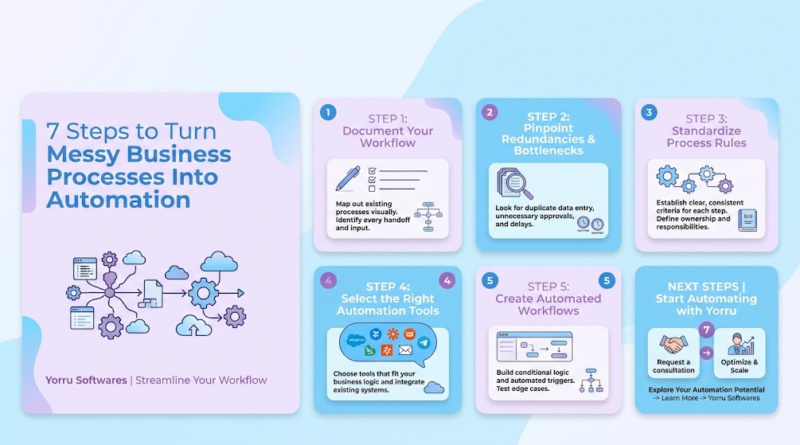
7 Steps to Business Process Automation | Streamline Operations
Every week, growing companies lose dozens of billable hours to invisible administrative operational friction. Picture a project manager copying customer details line-by-line from a web form into a spreadsheet, email chains stalling while waiting on a manager’s manual sign-off, or an onboarding specialist correcting repeated data-entry errors across three separate software tools. Often, an entire department relies on a single veteran employee who holds the unwritten rules of an operational workflow entirely in their head.
When operations feel chaotic, business process automation seems like the ultimate quick fix. However, buying a new software tool or setting up automated triggers across a broken workflow usually makes the confusion worse. Speeding up an inefficient process simply yields bad outcomes faster and at a much higher volume.
The true cost of bad workflows extends beyond delayed projects. It shows up in bloated labor costs, frequent compliance oversights, disappointed clients, and severe team burnout. Sustainable efficiency requires a grounded approach: successful process automation begins by simplifying and standardizing the underlying workflow before introducing code or software.
By following a structured seven-step framework, you can transform chaotic daily routines into streamlined, scalable systems that save time and support long-term business growth.
Why Automating a Broken Process Only Creates Bigger Problems
When business operations feel bogged down, leaders often rush to implement software tools before taking the time to map out what is actually happening under the hood. This desire for a quick fix typically leads to severe operational friction, as automated scripts amplify structural flaws across the entire organization.
Several core operational flaws routinely derail process automation initiatives:
-
Unnecessary Approval Layers: Requiring executive sign-offs on low-risk, routine items creates artificial administrative bottlenecks.
-
Duplicate Data Entry: Forcing team members to input identical client details into both a CRM and an ERP system leads to fragmented records and human error.
-
Unclear Responsibilities: Running workflows where ownership between sales, operations, and support remains ambiguous results in missed handoffs.
-
Manual Workarounds and Disconnected Tools: Using temporary spreadsheets or personal inbox folders to bridge gaps between incompatible software applications creates severe security and data integrity risks.
-
Inconsistent Processes Across Departments: Allowing different teams to handle the exact same task using divergent rules prevents predictable scaling.
Consider a mid-sized B2B service firm that attempted to speed up its client intake by setting up an automated trigger. The moment a prospect signed an online agreement, an automated script generated three separate project folders, sent a welcome packet, and pinged the account manager.
However, because the sales team frequently accepted custom contract terms without flagging them, the automated system routinely delivered incorrect onboarding documents and generated mismatched billing schedules. The team spent twice as much time manually undoing, correcting, and apologizing for bad automated actions as they previously spent managing intake manually.
Once the firm paused the system, standardized their contract terms, and added an explicit intake qualification check, the workflow ran seamlessly. Streamlining the operation first ensured that the automated tools actually delivered value.
Step 1: Map Your Current Workflow Before Changing Anything
Before evaluating new software platforms or writing a single line of code, you must document your existing workflow exactly as it operates today. Documenting actual daily habits—rather than management’s assumed process—is critical, as real-world execution is usually filled with informal workarounds that executive diagrams overlook.
A complete process map requires six fundamental components:
-
The Trigger: The precise event that initiates the process (e.g., a form submission or a paid invoice).
-
Tasks and Decisions: Every physical action, calculation, or judgment call required from start to finish.
-
Responsible Roles: The specific internal team members or external parties accountable for each task.
-
Systems and Tools: Every spreadsheet, email client, database, or software application involved.
-
Information Flow: The exact data points passed between steps (e.g., client contact info, project scopes, attachments).
-
The Final Output: The tangible deliverable signaling the workflow’s complete conclusion.
You do not need costly process-mapping software to map out your operations. A small team can simply use a whiteboard, index cards, or a shared digital canvas.
[Trigger: Contract Signed]
       │
       ▼
[Task: Manual Data Entry to CRM] ──► [Task: Email Account Manager]
       │                                     │
       ▼                                     ▼
[Decision: Custom Terms?] ─────────► [Task: Manual Folder Creation]
       │
       ▼
[Output: Account Activated]
Practical Example: Mapping Client Onboarding
Imagine mapping a client onboarding process for a specialized consultancy:
-
Trigger: A client signs a digital proposal.
-
Current Steps: Sales receives an email notification, manually re-types the client’s billing address into the accounting software, emails an ops manager to assign a lead strategist, waits for manual approval, creates a shared cloud storage folder, and sends a welcome email with links to project briefs.
-
Systems Used: Email, proposal software, cloud storage, accounting platform, and spreadsheet trackers.
-
Output: Account activated, initial invoice delivered, and project kicked off.
When you visually trace every handoff, missing links and unnecessary delays become immediately apparent.
Step 2: Eliminate Unnecessary Steps, Bottlenecks, and Rework
Once your workflow is laid out visually, inspect every step critically before introducing software. The goal of business process improvement is to trim unnecessary friction so that you only build technology around high-value activities.
Look for non-value-added steps, such as manager sign-offs on low-cost items that are almost never rejected, or frequent rework caused by missing information from earlier steps. Single-person bottlenecks, duplicate record-keeping, and unnecessary email notifications also signal a need for workflow cleanup.
The E.S.S.R. Framework for Process Simplification
To systematically audit your map, apply the E.S.S.R. Framework to every single action item:
-
Eliminate: Can this step be removed entirely without impacting the final deliverable quality or legal compliance?
-
Simplify: Can we reduce the complexity of this task (e.g., substituting an open-ended intake email with a structured form)?
-
Standardize: Can we establish a single unified method for executing this step across all team members?
-
Retain: Is this step essential, requiring human oversight or strategic judgment?
| Workflow Phase | Original Messy Process | Streamlined Process (Pre-Automation) |
| Data Collection | Client emails details across 5 separate threads | Client fills out one standardized intake form |
| Internal Review | Account Director manually reviews every routine deal | System auto-approves standard deals; Director reviews custom deals only |
| Task Assignment | Ops lead sends manual Slack messages to assign tasks | Clear logic maps deal types to specific team leads automatically |
By stripping away three manual handoffs and standardizing intake inputs, you can cut total cycle times significantly—long before any software engineering or workflow automation takes place. Note that not every manual task should be automated; tasks that require deep empathy, strategic negotiation, or creative judgment should remain firmly human.
Step 3: Choose the Right Tasks and Tools to Automate
How do you identify which business processes to automate first?
To select the best candidates for automation, evaluate existing tasks based on six criteria: frequency (how often the task occurs), time consumption (total hours spent), error rate (frequency of human mistakes), process consistency (how predictable the logic is), business impact (the value created by speeding up the step), and implementation complexity. Focus first on high-frequency, high-volume tasks that rely on clear, repeatable rules and carry low technical complexity.
Prioritize your workflow automation initiatives by evaluating implementation effort against operational return on investment.
       HIGH IMPACT
          │
  Quick   │   Major
  Wins    │   Projects
──────────┼────────── HIGH EFFORT
  Fill-In │   Avoid
  Tasks   │   For Now
          │
        LOW IMPACT
Matching the Technology to the Need
Selecting the correct technical architecture prevents over-engineering and keeps project costs aligned with actual business value:
-
No-Code / Low-Code Automation Platforms: Best for straightforward, low-risk task connections (e.g., sending a Slack notification whenever a new lead fills out a web form).
-
Application Integrations (APIs): Best for securely syncing structured data between core business tools (e.g., pushing closed CRM deals directly into your financial software via documented APIs).
-
AI-Powered Automation: Ideal for processing unstructured data or handling non-linear tasks (e.g., extracting key terms from PDF invoices, categorizing support tickets, or summarizing long meeting transcripts).
-
Custom Software Development: Essential for complex proprietary logic, specialized algorithms, strict compliance requirements, high data security standards, or deeply integrated SaaS products where off-the-shelf tools fall short.
Choosing the right approach depends on your long-term scalability goals, budget constraints, security requirements, and existing technical stack.
Step 4–7: Build, Test, Launch, and Improve Your Automation
What are the steps involved in automating a business process?
Automating a business process involves seven clear phases:
Mapping the current process to capture real-world execution.
Eliminating unnecessary steps and standardizing the workflow.
Selecting appropriate tasks and selecting matching technical tools.
Designing the improved workflow layout and data rules.
Building the technical connections and software integrations.
Testing edge cases rigorously with a pilot user group.
Monitoring post-launch operational metrics to drive continuous improvements.
Step 4: Design the Improved Workflow
Before writing code or configuring triggers, map out the technical blueprint for your modernized process. Clearly define the desired outcomes, explicit business rules, data transformation logic, and clear system connections.
Define precisely how the system handles exceptions. What happens when an incoming email is missing an attachment? Who gets notified if an API endpoint goes offline? Specifying task ownership and fallback actions in advance prevents costly technical rework during active development.
Step 5: Build the Automation and Connect Your Tools
With design specifications complete, connect your system components. This stage involves setting up API webhooks, configuring middleware platforms, or engineering custom software codebases to connect your operational systems.
For instance, an automated client intake solution might automatically capture submitted web data, validate the tax ID structure, push clean records into your account management database, and generate secure client access credentials. Throughout construction, prioritize robust data validation standards, strict user access permissions, and reliable execution logs to protect operational integrity.
Step 6: Test the Workflow Before Full Deployment
Never deploy a new process automation directly across your entire company without thorough validation. Test your workflow against standard operational pathways alongside complex edge cases:
-
Form submissions missing critical secondary contact details.
-
Duplicate user profile entries.
-
Unexpected data formats (e.g., text inputs inside numerical phone fields).
-
Temporary API server outages or network timeouts.
Run a controlled pilot phase with a small group of end-users. Their immediate feedback will surface real-world friction that technical testing might miss. Keep human oversight steps intact for high-risk, high-value, or sensitive judgment calls.
Step 7: Measure Results and Improve Continuously
Once your automation goes live, track operational performance continuously to ensure it achieves your targets. Benchmark your post-launch performance against your initial baseline metrics.
Key performance indicators to track include:
-
Average Completion Time: Total hours or days needed to execute the workflow from end to end.
-
Direct Time Savings: Estimated manual working hours reclaimed by staff.
-
Error and Rework Rates: Frequency of missing data, corrections, or failed executions.
-
Cost Per Transaction: Total operational expense associated with processing each workflow unit.
-
System Failure Rates: Percentage of execution runs that hit technical or integration errors.
Treat process automation as an ongoing cycle of optimization rather than a one-time project. Regular reviews ensure your systems adapt smoothly as your business scales.
What Does Successful Business Process Automation Look Like?
To see how these steps connect in practice, consider an illustrative scenario of a fast-growing B2B logistics company struggling with customer onboarding.
The Original Problem
The company relied on manual email threads, disconnected spreadsheets, and verbal reminders to onboard new commercial accounts. Account managers spent roughly 6 hours per client re-keying registration details across three systems, chasing signatures, and setting up tracking portals. Data-entry mistakes delayed account activations by an average of 4 business days, leading to frustrated clients before operations even began.
The Simplified & Automated Workflow
The team streamlined their approach using a structured process improvement framework:
-
Simplified: They combined four separate email requests into one dynamic, web-based intake portal.
-
Automated: They engineered custom API connections linking the intake portal, CRM, internal logistics database, and billing platform.
-
Monitored: They implemented an automated dashboard tracking real-world completion times and data verification errors.
+-------------------------------------------------------------------+
|                        BEFORE AUTOMATION                          |
|  Client Email ──► Manual CRM Entry ──► Email Signatures           |
|  ──► Spreadsheet Update ──► Manual Portal Creation                |
|  (Cycle Time: 4 Days | Manual Effort: 6 Hours/Client)              |
+-------------------------------------------------------------------+
                                  │
                                  ▼
+-------------------------------------------------------------------+
|                         AFTER AUTOMATION                          |
|  Dynamic Intake Form ──► Secure API Data Sync ──► Auto Portal Setup|
|  ──► Instant Staff Alert                                          |
|  (Cycle Time: 15 Minutes | Manual Effort: 0.5 Hours/Client)       |
+-------------------------------------------------------------------+
The Business Outcome
By automating manual business processes, the company reduced manual administrative time to 30 minutes per client while cutting account activation times from 4 days to 15 minutes. Data-entry errors fell to zero, and account managers diverted their freed-up time toward proactive client relationship management.
By simplifying the process before applying technology, the company transformed a major operational bottleneck into a competitive advantage.
Ready to Turn Your Workflow Into a Scalable System?
Transitioning from chaotic daily tasks to a scalable operational system starts with a single step. Pick one frustrating, time-consuming process in your business today—whether it is client intake, invoice processing, project setup, or team reporting—and map out every step as it currently exists. Identify the redundant approvals, manual data entry, and bottlenecks holding your team back.
While low-code tools work well for simple tasks, growing operations often hit technical walls requiring specialized custom software logic, advanced database integrations, strict data security, and seamless API performance.
Working with an experienced software development partner helps you evaluate complex workflows, identify high-ROI automation opportunities, connect legacy tools, and engineer tailored software platforms designed for long-term growth.
Ready to streamline your business operations? Contact our technical strategy team today for a comprehensive workflow assessment and discover how custom software development can transform your messy processes into scalable, automated systems.
