
How to Rebuild an App From Scratch (7 Client Lessons)
Deciding to rebuild an app from scratch is rarely a founder’s first choice, but it is often the turning point for a product suffocating under its own technical debt. Recently, a growing client handed us an aging software product that was struggling to keep up with their user base. Features took months to ship, bugs multiplied with every update, and the infrastructure costs were ballooning.
When we looked beneath the surface, we found a tangled web of workarounds that incremental patches could no longer save. We chose to tear it down and start over.
Using this recent project as a blueprint, here is an inside look at why a complete software application rebuild sometimes makes more financial and operational sense than continuing to patch legacy code, what we uncovered in the process, and the core lessons you can apply to your own digital products.
Why We Decided to Rebuild the App Instead of Fixing It
Software is a living asset. Over time, original developers leave, quick fixes become permanent, and business requirements outgrow the initial architecture. In our client’s case, continued patching had simply become too expensive and risky.
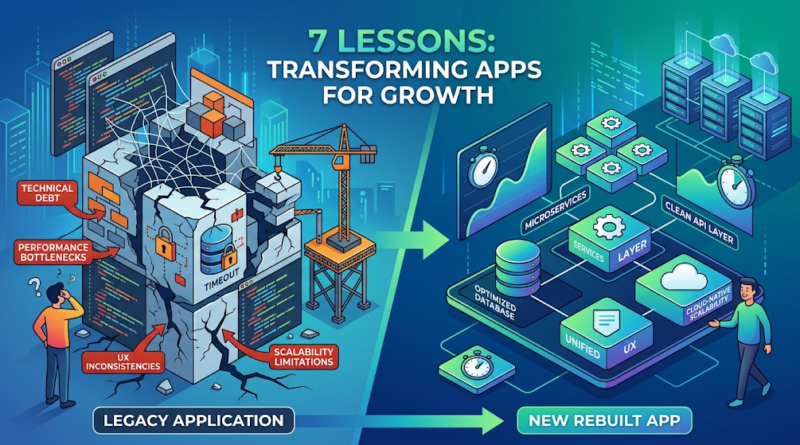
Every time the development team tried to add a new feature, something unrelated would break. This brittleness stemmed from a high accumulation of technical debt and a monolithic architecture that lacked modularity. The application suffered from severe maintainability issues; there was no automated testing, meaning quality assurance was a slow, manual process. Furthermore, scalability limitations meant that database locks and server timeouts were common during peak traffic hours.
However, rebuilding from scratch is not automatically the right answer for every aging product. If your core architecture is fundamentally sound, your dependencies are reasonably up to date, and your main issue is an outdated interface, an iterative refactoring process or a UI refresh is usually preferable. We opted for full legacy app modernization only because the underlying foundation was fundamentally incapable of supporting the company’s future roadmap without risking major security vulnerabilities and performance failures.
What We Discovered Under the Hood
When a development team deeply audits an existing application, the discoveries usually validate the product team’s worst fears. Peeling back the layers of this particular application revealed a textbook case of compounding technical debt.
Here is what we found:
-
Outdated Dependencies: The app relied on third-party libraries that had been deprecated for years, creating significant security vulnerabilities and blocking framework upgrades.
-
Database Sprawl: Rather than a cleanly normalized relational database, we found massive, sprawling tables with duplicate data. A single user action was triggering dozens of unnecessary database queries.
-
Poor API Design: The frontend and backend were tightly coupled. Instead of clean REST or GraphQL APIs, business logic was baked directly into the presentation layer, making a mobile app redevelopment impossible without rewriting the backend anyway.
-
UX Inconsistencies: Years of bolting on new features had resulted in a fragmented user experience. Different sections of the app had entirely different navigation paradigms.
These weren’t just abstract code problems; they were actively causing app performance optimization bottlenecks that frustrated end-users and cost the business money.
The Biggest Problems We Had to Solve
Rebuilding a plane while it is flying is notoriously difficult. Our challenge was to execute a custom software development project that completely replaced the old system without disrupting the client’s existing revenue streams.
Preserving Core Functionality Without Bringing the Baggage We had to deeply map the existing business logic. Often, users rely on undocumented “quirks” of a legacy system to do their jobs. We had to ensure we didn’t accidentally remove essential functionality while trimming away the bloat.
Migrating Complex Data Data migration was our highest risk factor. We had to map a chaotic, unoptimized legacy database schema to a clean, modern, normalized architecture. This required writing robust migration scripts and running multiple dry-run migrations to ensure zero data loss during the final cutover.
Improving UX Without Alienating Users Existing users hate change, even when it is for the better. We had to balance modernizing the interface with maintaining familiar workflows, ensuring that the transition felt intuitive rather than disruptive.
Managing the Cutover To mitigate migration risks, we designed the new architecture to run in parallel with the old one, utilizing a beta-testing group to validate the new system against live data before executing a final, carefully timed DNS switch.
7 Lessons We Learned From the Rebuild
1. Technical debt eventually becomes a business problem.
-
What it means: Bad code doesn’t just annoy developers; it impacts the bottom line.
-
Why it matters: When a codebase is fragile, engineering velocity drops to near zero. You pay high salaries for developers who spend 80% of their time fixing bugs rather than building value.
-
Practical example: In our client’s app, a simple pricing tier update took three weeks to deploy because the logic was hardcoded in fourteen different places.
-
What to do: Treat technical debt like financial debt. Pay it down regularly during standard development cycles before it bankrupts your engineering capacity.
2. A rebuild should start with product and business requirements, not code.
-
What it means: App redevelopment is a product exercise first and an engineering exercise second.
-
Why it matters: If you just copy the old app line-for-line in a new language, you will carry over the same flawed assumptions and outdated features.
-
Practical example: We discovered three major features in the legacy app that had zero usage in the last twelve months. We cut them from the rebuild entirely.
-
What to do: Audit your existing feature usage. Define what the business actually needs today, and build only that.
3. Existing users should influence the new UX.
-
What it means: A shiny new interface is worthless if your power users can’t figure out how to navigate it.
-
Why it matters: Rebuilds run a high risk of user churn if the learning curve for the new application is too steep.
-
Practical example: We released early wireframes to a select group of veteran users and discovered that moving a specific reporting dashboard hid a workflow they used daily. We adjusted the navigation before writing a single line of frontend code.
-
What to do: Form a customer advisory board. Test prototypes with them early and often.
4. Performance problems often have architectural causes.
-
What it means: You cannot cache or load-balance your way out of a fundamentally broken architecture.
-
Why it matters: Slow apps kill retention. If the core way your application processes data is flawed, superficial fixes will only buy you weeks, not years.
-
Practical example: The legacy app suffered from severe N+1 query problems. By rebuilding the API layer to batch database requests, we reduced page load times from 8 seconds to 400 milliseconds.
-
What to do: Profile your application to find the true bottlenecks. If the issue is deep in the data model, plan for structural refactoring.
5. Data migration needs to be planned early.
-
What it means: Moving data from the old system to the new system is an engineering project in its own right.
-
Why it matters: Data is the lifeblood of the application. Corrupted or missing data during a rebuild will instantly erode customer trust.
-
Practical example: We dedicated an entire two-week sprint early in the project exclusively to writing and testing the ETL (Extract, Transform, Load) scripts, rather than leaving it as an afterthought for launch week.
-
What to do: Map your old database schema to your new one before you finalize backend development. Run test migrations weekly.
6. Scalability should be designed into the new architecture.
-
What it means: The new app must be built to handle not just today’s user base, but the traffic you expect in three years.
-
Why it matters: A successful app development for startups effort anticipates growth. You don’t want to fund a massive rebuild only to need another one in 24 months.
-
Practical example: We moved the client from a monolithic server setup to a containerized, cloud-native architecture that automatically spun up new instances during traffic spikes.
-
What to do: Decouple your frontend from your backend, use scalable database solutions, and rely on managed cloud services where appropriate.
7. A rebuild is an opportunity to remove unnecessary complexity.
-
What it means: Simplicity is the ultimate sophistication in software.
-
Why it matters: Complex code is hard to test, hard to secure, and hard to maintain. A rebuild allows you to strip away the over-engineered solutions of the past.
-
Practical example: The legacy app used a complex, custom-built authentication system that was constantly failing. We ripped it out and replaced it with an industry-standard, third-party authentication provider (OAuth), cutting thousands of lines of liability from the codebase.
-
What to do: Leverage proven third-party tools and managed services for non-core features (like auth, payments, or email delivery) so your team can focus on unique business logic.
What Founders Should Know Before Rebuilding an App
Before greenlighting a massive overhaul, leaders need to objectively evaluate their current software.
Is it better to rebuild an app or improve the existing code?
If your codebase is modular, relies on supported technologies, has decent test coverage, and simply suffers from isolated bugs or an outdated UI, improving the existing code (refactoring) is almost always the better choice. It is faster, cheaper, and less risky.
However, you should rebuild if the core framework is end-of-life, the database architecture is fundamentally flawed, security vulnerabilities are baked into the system, or developer velocity has flatlined because the code is too convoluted to safely modify.
How much does it cost to rebuild an app from scratch?
There is no universal price tag for a rebuild. The cost depends entirely on the application’s complexity, the platforms involved (e.g., web vs. native mobile), the volume of historical data to migrate, third-party integrations, and the geographic location of your development team. A simple internal tool rebuild might cost $30,000 to $50,000, while a complex enterprise SaaS platform with mobile applications could easily range from $150,000 to over $500,000. Do not view the cost simply as an expense; view it alongside the money you are currently losing to high maintenance overhead, lost developer productivity, and customer churn.
The Modernization Checklist
If you are weighing your options, use this simple framework to audit your product:
-
Developer Velocity: How long does it take to ship a simple feature compared to a year ago?
-
Maintenance Ratio: What percentage of engineering time is spent fixing bugs versus building new value?
-
Infrastructure Costs: Are server costs rising disproportionately to user growth?
-
Security Posture: Are you relying on outdated, unsupported frameworks or libraries?
-
Business Alignment: Can the current architecture support your 3-year product roadmap?
If you answered negatively to several of these questions, patching the system is no longer a viable long-term strategy.
A struggling application doesn’t have to define your company’s growth ceiling. Recognizing when it is time to stop patching and start building fresh is one of the most critical decisions a technical leader can make.
If your software has become too slow to scale, too fragile to update, or too expensive to maintain, it might be time for a clean slate. The team at Yorru Softwares specializes in rescuing complex applications, untangling legacy code, and engineering scalable platforms built for the future. Contact us today to discuss your application architecture and find out if a strategic rebuild is the right move for your business.
