
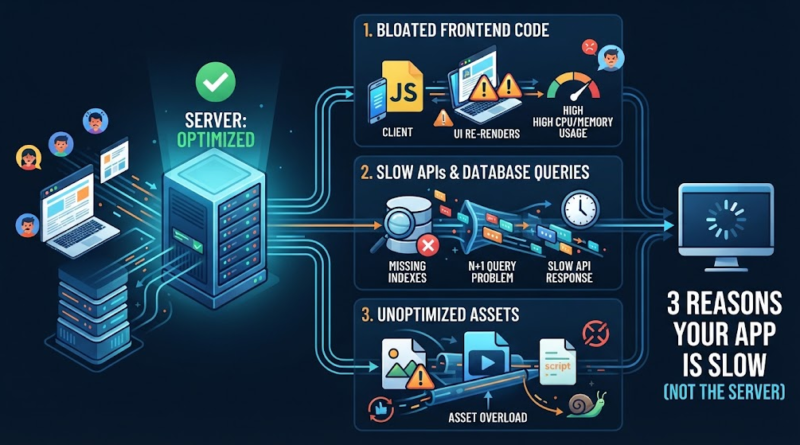
3 Reasons Your App Is Slow (Not the Server)
If you notice users complaining about lag or if your app is slow despite having a powerful cloud infrastructure, your immediate instinct might be to blame the server. Your product manager flags a sharp dip in conversion rates, and the knee-jerk reaction for many business leaders is simple: our servers are overwhelmed, so let’s upgrade our hosting.
Yet, a week and hundreds of dollars in higher hosting bills later, the application is just as sluggish as before. Why is my app so slow even though the server is fast?
The truth is that server capacity is rarely the primary culprit behind poor app performance optimization. When an application is running slow, the bottleneck is usually hiding deep within the codebase, database design, or network architecture. Throwing more RAM and CPU power at a poorly optimized software stack is like adding more lanes to a highway when the real problem is a traffic jam at the exit ramp.
Your Server Might Be Fine: Where App Slowdowns Really Start
Modern cloud infrastructure—whether on AWS, Google Cloud, or Azure—is remarkably powerful. Unless you are experiencing an unmanaged, viral traffic spike, your server is likely processing requests just fine.
The real slowdown typically occurs along the application performance chain: Frontend → API → Database → Network → Assets. If any link in this chain is clogged, hardware upgrades will do very little to help. To truly improve app performance, leadership teams and technical decision-makers need to look past infrastructure bills and examine the software layer itself.
1. Bloated Frontend Code Can Drag Your App Down
Often, the device doing the heaviest lifting isn’t your cloud server at all—it is your user’s browser or smartphone. If an application feels unresponsive the moment someone opens it, frontend code bloat is usually to blame.
Oversized Bundles and Unnecessary Rendering
Modern web and mobile development rely heavily on frameworks like React, Vue, Angular, or Flutter. While powerful, they can lead to massive JavaScript bundles if left unoptimized.
If a user’s browser has to download, parse, and execute five megabytes of JavaScript before displaying a single interactive button, the app will feel sluggish right out of the gate. Furthermore, unnecessary re-rendering—where user interface components update repeatedly in the background without changing state—freezes the UI thread and harms overall mobile app performance.
The Hidden Weight of Third-Party Scripts
Marketing pixels, live-chat widgets, error-tracking tools, and heat-mapping software are frequently injected into applications without performance oversight. Each third-party script adds network requests, background processing overhead, and potential blocking scripts that stall the user experience.
-
How to fix it: Instruct your engineering team to audit third-party tags, implement code-splitting to load only what is needed per page, and utilize lazy-loading for heavy UI components.
2. Slow APIs and Database Queries Create Hidden Delays
If the frontend is the face of your application, the backend data layer is the engine. However, even with a robust server, inefficient data handling can cause massive latency and a frustrating slow API response.
Inefficient Database Queries and Missing Indexes
A sluggish API is rarely an issue with server hardware; it is almost always an issue with how data is queried. If a database query lacks proper indexing, the database engine has to scan millions of rows from top to bottom every time a user searches for a product or loads their dashboard.
Effective database performance optimization starts with analyzing slow query logs, eliminating redundant queries, and adding indexes to frequently searched columns.
Unoptimized API Design and the N+1 Problem
Another common pitfall is poor API architecture. If an application makes 50 separate round-trip requests to fetch a list of user profiles and their corresponding avatars instead of retrieving them in a single batch query (known as the N+1 query problem), network latency multiplies exponentially. Streamlining API endpoints to return only the necessary data payloads prevents network congestion and dramatically speeds up data retrieval.
3. Poor Asset and Performance Optimization Adds Up
Sometimes, an application is weighed down by physical weight—literally, megabytes of uncompressed images, videos, and static assets.
When teams upload high-resolution photography straight from a camera or design tool (often 4MB to 8MB per image) without resizing, compression, or modern formats like WebP or AVIF, they force mobile devices to download massive amounts of data over cellular connections. Combine this with a lack of browser caching policies or a Content Delivery Network (CDN), and every single page load forces a fresh download from the origin server rather than serving cached assets from a server edge location nearby.
Addressing these issues is a foundational part of comprehensive application performance optimization. Proper asset compression and edge delivery can slash loading times overnight without touching a single line of backend logic.
How to Find and Fix the Real Cause of App Slowness
If throwing money at hosting does not work, how can you systematically figure out what is actually wrong? How can I improve my app’s performance and loading speed without blindly rewriting code?
A structured diagnostic approach beats guesswork every time:
-
Analyze the Network Waterfall: Use browser developer tools or application performance monitoring (APM) tools like Datadog, New Relic, or Sentry to inspect the network tab. Look for requests that take seconds to resolve. Is it a massive script, a delayed API payload, or an oversized image?
-
Inspect Database Logs: Review database query performance metrics. Identify queries that run frequently or take over 100 milliseconds to execute.
-
Monitor Real User Experience (RUM): Rely on real-world metrics like Core Web Vitals (such as Largest Contentful Paint and Interaction to Next Paint) rather than synthetic local tests.
When should you actually consider server optimization? Only after you have confirmed that CPU utilization, memory leaks, or connection pool exhaustion at the server level are genuine bottlenecks. Even then, code efficiency usually yields a higher return on investment than simply provisioning a larger server instance.
Conclusion
A slow app does not automatically mean your server is the problem. More often than not, performance bottlenecks live in bloated frontend bundles, unoptimized database queries, heavy assets, or poor API architecture. Diagnosing the complete application stack before investing in costly infrastructure upgrades saves capital and delivers a vastly superior user experience.
If your team is struggling with an application that is running slow and you want to uncover the true root causes, our engineering team can help. Reach out to schedule a comprehensive performance audit, technical consultation, or custom application optimization project to get your software running at peak speed.
