
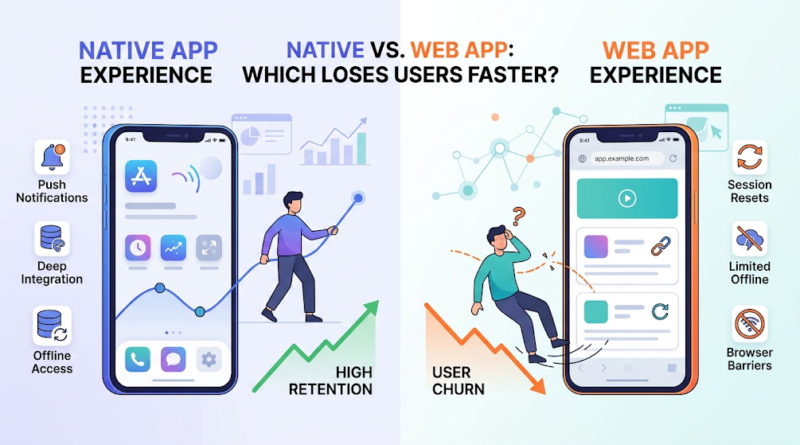
Native App vs. Web App: Which Loses Users Faster?
A B2B SaaS company builds an iOS and Android application for enterprise field technicians. They spend six months on custom native code, navigate complex app store approval delays, and finally launch. Three months later, 75% of new sign-ups drop off during onboarding. Technicians on remote job sites with spotty cellular coverage refuse to wait for a 70MB app download just to submit a single daily inspection report.
Across town, a competitor launches a lightweight mobile web application accessible instantly via a QR code. Early signup metrics surge. However, within two months, customer retention crashes. Every time a technician loses internet connectivity mid-inspection, the browser refreshes, wiping unsaved form data.
Both companies lost users rapidly. Neither failed because their technology stack was inherently bad; they failed because their software architecture actively fought their users’ operational reality. When evaluating a native app vs web app, the central question isn’t which architecture is technically superior. It is which approach introduces the least friction for your specific business model and target user.
Native App vs Web App: The User Experience Gap
To understand where platforms fail, business leaders must look at how each system interacts with device hardware and operating systems.
Native App vs Web App: Core Architectural Differences
A native app is built specifically for a target mobile operating system using platform-specific programming languages (such as Swift or Swift UI for iOS, and Kotlin for Android). It is downloaded from an app store, installed directly onto device storage, and runs directly on hardware. This architecture grants full access to system APIs—including biometrics, background processing, low-latency Bluetooth, and advanced camera hardware.
A web app runs inside a standard web browser (like Safari, Chrome, or Edge) and is built using web standards such as HTML, CSS, and JavaScript frameworks (React, Vue, Angular). Users access it instantly through a web URL. There are no app store approvals or mandatory downloads required.
This architectural difference creates a distinct native app user experience across key operational touchpoints:
-
Hardware and Device Integration: Native software integrates directly with hardware components. Biometric authentication (Face ID/Touch ID), haptic feedback, background location tracking, and camera capabilities operate seamlessly. Web applications access device hardware through browser-level APIs, but features remain subject to strict browser security sandboxing and vendor restrictions (particularly within iOS Safari).
-
Offline Functionality: Native applications write directly to local file systems and databases (like SQLite or Realm). Users can process data, navigate complex interfaces, and draft content entirely offline, automatically syncing state when connections restore. Web applications rely on browser storage and service workers, which work well for lightweight content caching but degrade under heavy, complex offline workflows.
-
Navigation and Interface Polish: Native applications leverage OS-native UI libraries, providing fluid 60-to-120 FPS animations, platform-standard gestures (like swipe-to-dismiss), and zero input latency. Web applications must simulate these gestures, which can sometimes lead to minor UI lag, accidental page reloads, or broken scrolling behavior on mobile viewports.
-
Access and Distribution: Web applications excel at immediate accessibility. A user clicks a shared link, completes a purchase or workflow, and moves on. Native applications require users to commit to an app store visit, authenticate a download, wait for installation, and allocate storage space on their device.
Performance vs. Convenience: What Actually Keeps Users Coming Back?
Product teams frequently debate whether raw computing performance or low-friction access drives long-term customer engagement. In practice, both influence retention, but at completely different points in the customer funnel.
Is a native app better than a web app for user retention?
Not universally. While native apps often boast higher long-term retention rates in consumer product categories, retention is ultimately driven by utility, usage frequency, and habit formation—not platform architecture alone.
       HIGH  │  Native App Advantage         │  Native or Web App
             │  (Daily habit loop,           │  (High utility, native
             │   push alerts, offline)       │   features or rich SaaS)
FREQUENCY    ├───────────────────────────────┼───────────────────────────────
             │  High Churn Risk              │  Web App Advantage
             │  (Excess friction for         │  (Instant access, zero
        LOW  │   infrequent value)           │   install barrier)
             └───────────────────────────────┴───────────────────────────────
                            LOW                             HIGH
                                    HARDWARE INTEGRATION
Technical Performance vs. Perceived Convenience
Native applications offer undeniable performance advantages. Because code compiles directly into native binary instructions, native app development yields faster computational speeds, efficient multithreaded operations, and responsive graphic rendering. For high-frequency, complex tools—such as mobile banking, real-time messaging, or health tracking—this speed reduces micro-frustrations that drive long-term user churn.
However, convenience frequently trumps raw speed during early user interactions. If an individual needs to complete an infrequent task—such as paying for parking, booking a service, or reviewing a vendor quote—forcing a 50MB native download creates a massive conversion drop-off. In a head-to-head web app vs mobile app comparison for low-frequency actions, web tools deliver higher task-completion rates simply because they require zero onboarding commitment.
The Re-Engagement Mechanism
Where native architectures maintain a structural advantage in mobile app user retention is long-term re-engagement. A native app lives permanently on the user’s home screen, serving as a continuous visual trigger.
More importantly, native applications possess reliable, hardware-level push notification access across both iOS and Android. While web push notifications exist, their adoption on mobile browsers—especially Safari—requires explicit permissions, home-screen installation, or complex user opt-ins. For products that rely on timely alerts to trigger habit loops (e.g., delivery updates, security notifications, or marketplace communications), native push capabilities provide a vital edge.
The Hidden Reasons Users Abandon Apps
User abandonment rarely occurs because a customer actively dissects your technical stack. It happens because compounding micro-frictions slowly erode the product’s value proposition. Choosing an architecture that conflicts with your operational model creates predictable failure points.
                     ┌───────────────────────────────┐
                     │    User Friction & Churn      │
                     └───────────────┬───────────────┘
                                     │
           ┌─────────────────────────┴─────────────────────────┐
           ▼                                                   ▼
┌─────────────────────┐                             ┌─────────────────────┐
│  Web App Failures   │                             │ Native App Failures │
├─────────────────────┤                             ├─────────────────────┤
│ • Session resets    │                             │ • Download friction │
│ • Broken offline    │                             │ • App store delays  │
│ • Weak push alerts  │                             │ • Storage blowouts  │
└─────────────────────┘                             └─────────────────────┘
How Web Apps Lose Users
-
Session Resets and State Loss: Mobile browsers manage system memory aggressively. If a user switches to another app mid-workflow, a mobile browser may clear the web app from RAM. When the user returns, the page refreshes, wiping out unsaved data and causing immediate drop-offs.
-
Unresponsive Mobile Viewports: Web applications engineered primarily for desktop monitors often suffer when scaled down to mobile screen sizes, resulting in misaligned buttons, poor tap targets, and broken touch gestures.
-
Inconsistent Re-Engagement Channels: Without a persistent home-screen footprint or reliable push notification pipeline, web apps rely heavily on email or SMS to bring users back, leading to lower returning-user metrics over time.
How Native Apps Lose Users
-
The Acquisition Download Wall: A significant percentage of potential users abandon products between clicking an external link or ad and completing an app store download. Demanding a full installation before proving product value causes substantial top-of-funnel loss.
-
Storage and Update Fatigue: Heavy native apps consume precious device storage. On mid-tier or older hardware, users routinely clear large, infrequently used apps to free up space. Furthermore, mandatory app store updates interrupt user flows if back-end API changes break older client builds.
-
Intrusive Upfront Permissions: Prompts requesting access to location, camera, contacts, and notifications upon first launch trigger security concerns, leading to immediate uninstalls.
Technical decision-makers must evaluate these risks alongside general product strategy. Exceptional design, intuitive onboarding, transparent pricing, and strong market fit remain the true drivers of software survival—your technology stack simply determines how efficiently that value is delivered.
Native App vs Web App: Match the Technology to Your Product
To choose the right path, map your product requirements against the operational strengths of each technology. Understanding native vs web application trade-offs helps software leaders invest capital efficiently from day one.
When Native App Development Makes Sense
-
Mobile-First Consumer Products: Habit-building applications intended for daily multi-session engagement where real-time push alerts drive core activity loops (e.g., social platforms, fintech, fitness tracking).
-
Hardware-Dependent Software: Products requiring direct communication with local hardware peripherals, background BLE (Bluetooth Low Energy) connectivity, continuous spatial GPS tracking, or advanced camera/AR filters.
-
Offline-Critical Enterprise Utilities: Software designed for field workers, logistics teams, or remote operators who must record high-volumes of critical data without guaranteed cellular coverage.
When Web App Development Makes Sense
-
B2B SaaS Engines and Admin Portals: Complex, multi-panel dashboards, analytical suites, internal management tools, and B2B workflow platforms designed primarily for desktop and tablet environments.
-
Search-Driven and Content Platforms: Businesses whose primary customer acquisition model relies on organic search engines (SEO), media indexing, dynamic social link sharing, and immediate landing page conversions.
-
Low-Frequency Utility Services: Platforms where users complete transactions infrequently—such as event ticketing, seasonal service booking, or mortgage estimation—making an app store download an unnecessary hurdle.
Technology Trade-off Matrix
The Decision Framework: Which App Type Fits Your Business?
Selecting the correct architecture requires aligning software engineering decisions with your commercial strategy. Use these fundamental diagnostic questions during product discovery:
1. What is the expected usage frequency and context?
If your platform requires daily interaction, rapid mobile interactions, and active notification loops, native engineering provides a stronger habit-building environment. If interaction occurs monthly, quarterly, or via desktop browsers, web architecture delivers superior acquisition economics.
2. How critical is immediate customer acquisition?
If your marketing strategy depends on organic search traffic, content marketing, or direct ad clicks converted via browser landing pages, start with a web application. Forcing search traffic through an app store installation funnel dramatically inflates acquisition costs.
3. Does the core functionality depend on hardware APIs?
Identify your product’s non-negotiable features. If core capabilities require continuous background processing, low-latency audio processing, physical hardware integration, or heavy local dataset manipulation, native architecture is required.
4. What are your budget and speed-to-market constraints?
Building native apps natively for both iOS and Android generally requires maintaining separate codebases and specialized development skills. Web app development consolidates logic into a single codebase, allowing startups to validate product assumptions rapidly and extend runway.
Hybrid and Progressive Strategies
You are not locked into a rigid binary choice. Modern software strategies frequently utilize middle-ground architectures:
-
Progressive Web Apps (PWAs): A web application enhanced with modern browser features, allowing users to save the app to their home screen, receive basic push notifications, and access cached content offline—bridging some native app vs web app differences without full app store deployment.
-
Cross-Platform Frameworks: Technologies like React Native or Flutter allow development teams to build native iOS and Android applications from a shared codebase, cutting development overhead while retaining access to native hardware performance.
-
The Phased Rollout Model: Many tech companies launch a web application first to establish product-market fit, drive organic search engine acquisition, and validate user workflows. Once core customer retention is proven, they invest in dedicated native apps to serve their most active power users.
Building a successful digital product requires aligning technology choices with real-world user behaviors, business constraints, and growth goals. Choosing between a native app and a web app isn’t about following tech trends—it’s about removing friction, delivering value, and building a product users actually return to.
If you are planning a new software platform or evaluating an architectural pivot for an existing product, our team can help you map out your technical roadmap. Contact our strategy team today to evaluate your product requirements, choose the right technology stack, and build a high-retention product designed for long-term scalability.
