
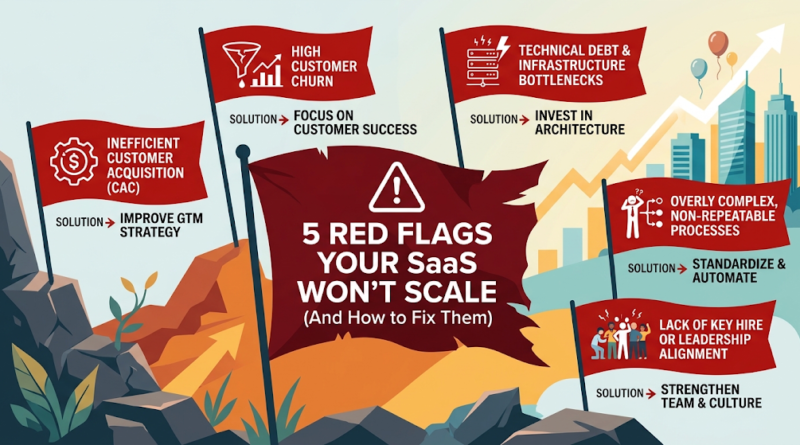
5 SaaS Scalability Red Flags (And How to Fix Them)
Most SaaS products don’t fail to scale because of one catastrophic mistake. They fail because a handful of small, tolerable problems quietly compound until they become expensive to fix. A slow query becomes a slow dashboard becomes an angry customer. A manual onboarding step becomes a bottleneck the whole support team dreads. A “quick fix” from eighteen months ago becomes the reason nobody wants to touch the billing module.
If you’re a founder or CTO watching your user base grow, the uncomfortable truth is this: SaaS scalability problems are almost always cheaper to fix early than to fix under pressure. Once you’re scrambling to keep the product stable during a growth spurt, you lose the luxury of careful decision-making. You end up patching instead of solving.
This article walks through five warning signs that your SaaS architecture, performance, operations, or cost structure may not be ready for the next stage of growth — and what to do about each one before it becomes an emergency.
Your SaaS Is Growing, but Its Architecture Is Already Struggling
Every SaaS architecture is built for a certain scale. What works cleanly for 500 users often starts creaking at 5,000, and what held up at 5,000 can buckle at 50,000. This isn’t a failure of the original design — it’s a natural consequence of growth. The problem is when teams don’t notice the strain until it shows up as downtime or a broken release.
Common signs your SaaS architecture is falling behind:
- Tightly coupled components. Changing one part of the system unexpectedly breaks another, and every release feels risky.
- Database bottlenecks. Queries that used to return instantly now time out during peak hours, and adding an index only buys you a few more months.
- Unreliable deployments. Releases require manual coordination, late-night deploy windows, or a “hope it works” mentality.
- Difficulty adding new features. Engineers spend more time working around the existing system than building on top of it.
Consider a common scenario: a SaaS product built as a single monolithic application with one shared database. In the early days, this is the right call — it’s fast to build and simple to reason about. But as the customer base grows, that same database starts handling reporting queries, transactional writes, and background jobs all at once. Response times degrade, and a single slow query can affect every customer, not just one.
The fix isn’t necessarily a full rewrite or a jump to microservices. That’s premature overengineering, and it introduces its own operational complexity. Instead, focus on targeted improvements:
- Profile before you refactor. Identify the actual bottlenecks using real production data, not assumptions.
- Optimize database queries and indexing before considering a more complex data architecture.
- Introduce caching for frequently accessed, rarely changing data.
- Separate workloads — for example, moving reporting queries off the primary transactional database.
- Plan a scalable SaaS architecture roadmap that evolves with demand, rather than trying to solve every future scenario today.
A useful gut check: is your architecture struggling with the load you have right now, or are you worried about hypothetical future load? The first is a real problem. The second usually isn’t — yet.
Slow Performance Is Becoming a Customer Retention Problem
Performance issues rarely start as an emergency. They start as a page that takes a second longer to load, an API call that occasionally lags, or a dashboard that feels sluggish during business hours. Left unaddressed, these small frictions add up to real churn.
The business impact is well documented. Google’s research on mobile page speed has found that as page load time increases from one to five seconds, the probability of a user bouncing rises sharply. For a SaaS product, slow performance doesn’t just hurt first impressions — it erodes trust with existing customers who rely on your product daily. Every extra second of latency is a small tax on user satisfaction, and enough small taxes eventually show up in your churn numbers.
A practical framework for diagnosing SaaS performance optimization issues:
1. Monitor continuously, not reactively
Set up application performance monitoring (APM) to track response times, error rates, and uptime in real time. You want to know about degradation before your customers report it.
2. Identify where the time actually goes
Slow performance can come from the database, the application layer, third-party API calls, or the frontend. Use tracing tools to pinpoint the actual source rather than guessing.
3. Set clear performance targets
Define acceptable thresholds — for example, API response times under a set number of milliseconds for core actions, or a target uptime percentage. Targets give your team something concrete to measure against.
4. Test under realistic load
Load testing with traffic patterns that resemble your actual usage (not just a generic stress test) reveals how your system behaves as it approaches its limits, before real customers find out for you.
Performance work is rarely glamorous, but it has a direct line to revenue: faster, more reliable products convert better, retain more customers, and generate fewer support tickets.
Every New Customer Requires More Manual Work
Here’s a scaling problem that has nothing to do with servers: if onboarding customer #500 takes as much manual effort as onboarding customer #50, your operations — not your technology — are the bottleneck.
This shows up in a few familiar ways:
- Someone on the team manually provisions accounts or configures settings for each new customer.
- Billing changes, plan upgrades, or invoicing require manual intervention.
- Support tickets pile up because there’s no self-service way to answer common questions.
- Customer data has to be manually migrated, cleaned, or reconciled.
None of these are visible to your product’s architecture diagram, but they cap how fast you can grow. A team that can only onboard ten customers a week manually will struggle to support a sales team closing thirty.
The fix is systematic automation, applied where it delivers the most value:
A simple framework to prioritize automation:
- List the repetitive processes your team handles for every new customer or every support request.
- Score each one by frequency (how often does it happen?), cost (how much team time does it consume?), and customer impact (does delay here directly hurt the customer experience?).
- Automate the highest-scoring items first — usually onboarding, provisioning, and billing, since they happen for every customer and directly affect time-to-value.
Practical automation opportunities include:
- APIs and webhooks to automatically provision accounts and sync data between systems.
- Background jobs to handle account setup, data processing, or notifications without manual triggers.
- Workflow automation tools to route support tickets, trigger billing events, or manage approvals.
- AI-assisted support to handle common questions, freeing your team for issues that need a human.
Automating operations isn’t just about efficiency — it’s what allows your business to scale revenue without scaling headcount at the same rate.
Technical Debt Is Slowing Down Your Product Roadmap
Technical debt is a normal part of building software quickly. The problem isn’t that it exists — it’s when it accumulates faster than your team can pay it down, and every new feature becomes slower and riskier to ship.
Signs of SaaS technical debt worth taking seriously:
- Outdated dependencies that are difficult or risky to upgrade.
- Fragile code that breaks in unexpected places when changed.
- Missing or minimal test coverage, making every release a gamble.
- Undocumented systems that only one or two engineers fully understand.
- Accumulated quick fixes that were meant to be temporary but became permanent.
Not all technical debt threatens SaaS scalability equally — some of it is just annoying, not dangerous. A messy but stable internal admin tool is a low priority. A payment processing module with no tests and an outdated security-sensitive library is a different category entirely — that’s debt with real operational and security risk attached.
A practical way to assess and prioritize technical debt:
- Inventory it. Have engineering leads list known problem areas across the codebase.
- Classify by risk, not just annoyance. Does this debt threaten security, data integrity, or uptime? Or is it mostly a productivity drag?
- Estimate the cost of inaction. How much slower does each new feature become because of this debt?
- Allocate dedicated capacity. Many engineering teams reserve a consistent percentage of each sprint for refactoring, testing, and documentation, rather than treating it as something to get to “later.”
The goal isn’t zero technical debt — that’s neither realistic nor necessary. The goal is keeping debt at a level where your team can still ship confidently and your roadmap doesn’t grind to a halt.
Your Infrastructure Costs Are Rising Faster Than Revenue
Growing infrastructure costs are expected. Growing infrastructure costs that outpace revenue growth are a scalability problem — one that quietly erodes your margins even while your customer count climbs.
This usually comes from a mix of:
- Over-provisioned compute resources running well below capacity.
- Inefficient database usage driving up storage and query costs.
- Third-party services and API costs that scale linearly (or worse) with usage, without corresponding revenue.
- A “just add more servers” approach to performance problems, instead of fixing the underlying inefficiency.
For illustration only: imagine a SaaS company whose infrastructure costs grew 40% quarter-over-quarter while revenue grew 15%. That gap, if it continues, turns a healthy business into an unprofitable one — regardless of how many customers sign up. This is a hypothetical example to illustrate the pattern, not an industry benchmark.
Simply scaling up hardware treats the symptom, not the cause. Practical ways to investigate and control infrastructure costs:
- Monitor resource utilization to identify over-provisioned or idle infrastructure.
- Allocate costs by feature or customer segment to understand which parts of the product are actually expensive to run — and whether pricing reflects that.
- Optimize database usage, including query efficiency, indexing, and archiving old or rarely accessed data.
- Right-size your infrastructure architecture for your current stage — the right setup for a 10-person startup is rarely the right setup for a 200-person company, and vice versa.
- Review third-party service costs regularly, especially usage-based tools that can scale unpredictably.
Healthy SaaS scaling means your infrastructure costs grow more slowly than your revenue over time — not that they stay flat.
A Quick Self-Assessment: Is Your SaaS Ready to Scale?
Ask yourself honestly:
- Can you trace performance issues to a specific cause, or are you guessing?
- Does onboarding a new customer require manual work that doesn’t shrink as you grow?
- Do your engineers hesitate before touching certain parts of the codebase?
- Are infrastructure costs growing faster than your revenue?
- Could your architecture handle 3x your current traffic without a major incident?
If you answered “no” or “not sure” to more than one of these, it’s worth digging deeper before your next growth phase puts these gaps under real pressure.
What Founders Should Take Away
Scaling problems rarely announce themselves clearly. They show up as a slightly slower dashboard, a support team that’s always a little behind, an infrastructure bill that keeps creeping up. The biggest challenges when scaling a SaaS product are usually a mix of architecture strain, performance degradation, operational bottlenecks, technical debt, and rising costs — and they tend to arrive together, not one at a time.
The good news: none of these require a complete overhaul to fix. They require honest assessment, the right priorities, and steady, deliberate investment before the pressure builds.
Let’s Look at Your SaaS Together
If any of these red flags sound familiar, it’s worth getting a clear-eyed view of where your product actually stands before your next growth spurt forces the issue. Our team works with SaaS founders and engineering leaders on architecture reviews, performance optimization, technical debt assessments, and scalable SaaS development — helping you understand exactly what needs attention now, and what can wait.
Get in touch to talk through your SaaS’s current architecture, performance, and cost structure, and we’ll help you build a practical plan to scale with confidence.
