
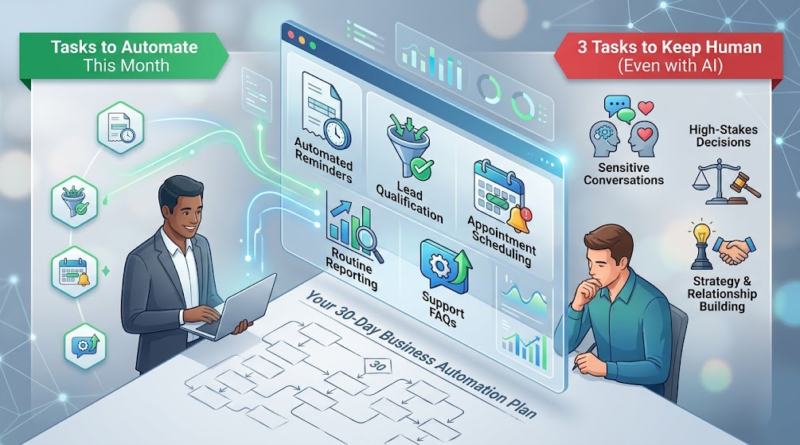
5 Business Tasks to Automate This Month (and 3 to Avoid)
Picture a typical Tuesday afternoon: an operations manager spends forty-five minutes copying data from website forms into a spreadsheet, twenty minutes drafting routine late-payment reminders, and another hour manually pulling sales numbers for a weekly report. Meanwhile, high-value proposals sit unwritten, prospective client calls remain unreturned, and strategic planning gets pushed to next week. This scenario plays out in thousands of growing businesses every day. The friction isn’t caused by a lack of hard work; it stems from skilled professionals spending prime working hours on mechanical, repetitive processes.
Implementing business automation isn’t about replacing your team or turning your operations into an unfeeling algorithm. The most effective approach focuses on eliminating administrative friction—automating routine, rules-based tasks while deliberately preserving human oversight where strategy, empathy, and judgment matter most.
Start Here: How to Spot Business Tasks Worth Automating
Before investing in software or introducing complex workflows, you need to identify which tasks to automate in a business to maximize return on investment. Not every repetitive process is a good candidate for automation; applying software to a broken or unstable process only accelerates chaos.
To evaluate whether a task is ripe for repetitive tasks automation, assess it against these core criteria:
-
Frequency and Volume: Does the task happen daily or multiple times a week?
-
Predictability: Does the process follow explicit, logical rules without requiring subjective interpretation?
-
Error Rate: Do manual copy-paste steps frequently introduce typos, missed follow-ups, or minor operational errors?
-
System Stability: Is the underlying process consistent, or does it change every few weeks?
-
Implementation Effort: Can the task be automated using existing tool integrations or straightforward workflow logic?
The Automation Prioritization Matrix
You can score candidate tasks using a simple framework. Rate each factor from 1 (Low) to 5 (High):
A high score signals a prime opportunity for business process automation. A task that consumes 10 minutes but occurs 30 times a week consumes 5 hours of working time every week. Over a year, that single process consumes 250 hours—more than six full working weeks. If that workflow is predictable, automating it yields immediate operational gains.
5 Business Tasks You Can Automate This Month
Here are five practical business tasks to automate within the next 30 days to free up operational bandwidth and reduce administrative overhead.
1. Invoice Reminders and Routine Accounts Receivable Follow-Ups
-
The Business Problem: Unpaid invoices stall cash flow, yet manual follow-ups require constant tracking and absorb valuable administrative time.
-
How It Works: When an invoice reaches a pre-set threshold (e.g., 3 days before due date, on the due date, or 7 days overdue), your accounting platform automatically generates and sends a personalized email notification with a direct payment link.
-
Realistic Example: A digital agency sets up a sequence where clients receive a courteous payment link 3 days prior to due dates, followed by automated weekly reminders for overdue balances.
-
Main Benefit: Accelerates receivables and improves cash flow without consuming staff time.
-
Implementation Consideration: Maintain human oversight for disputed invoices or clients with temporary payment arrangements to prevent sending automated demands during sensitive negotiations.
2. Lead Capture, Qualification, and CRM Updates
-
The Business Problem: Inbound leads sit unaddressed in email inboxes for hours, resulting in cold prospects and missed sales opportunities.
-
How It Works: Submissions from website forms or landing pages automatically create or update prospect records in your CRM, tag the lead source, assign account owners based on territory or service line, and trigger an immediate confirmation email.
-
Realistic Example: A software firm routes inbound inquiries through workflow automation tools that check company size. Leads meeting ideal client profiles get tagged as high-priority and assigned to a sales representative, while smaller accounts receive an automated resource guide.
-
Main Benefit: Eliminates manual data entry and dramatically reduces response time to inbound prospects.
-
Implementation Consideration: Ensure lead scoring rules are thoroughly tested so high-value enterprise prospects are never mistakenly misrouted or filtered out.
3. Appointment Scheduling and Meeting Reminders
-
The Business Problem: Back-and-forth email exchanges to find mutually agreeable meeting times waste hours every week.
-
How It Works: Scheduling tools integrate directly with team calendars, allowing clients and prospects to select open time slots based on pre-defined availability rules. Automated email or SMS confirmations and reminders follow.
-
Realistic Example: A management consultancy embeds scheduling links into client onboarding materials, allowing clients to book kickoff calls based on real-time consultant availability while automatically sending calendar invites and video links.
-
Main Benefit: Eliminates administrative back-and-forth and significantly cuts down on meeting no-shows.
-
Implementation Consideration: Set strict buffer times between bookings to prevent back-to-back calendar fatigue.
4. Routine Reporting and Data Consolidation
-
The Business Problem: Managers spend the first few hours of every week copy-pasting numbers from isolated systems into spreadsheets to build management reports.
-
How It Works: Data connectors aggregate metrics from sales, marketing, and operational tools into a single dashboard or automated weekly email summary.
-
Realistic Example: An e-commerce distributor uses automated data pipelines to compile inventory levels, weekly order volumes, and fulfillment speeds into a consolidated Monday morning report for department heads.
-
Main Benefit: Provides real-time operational visibility while saving hours of manual data assembly.
-
Implementation Consideration: Periodically verify underlying data sources to ensure connected APIs or database queries remain accurate and up-to-date.
5. Repetitive Customer Support Questions and Internal Notifications
-
The Business Problem: Support teams are overwhelmed by basic inquiries like “What are your business hours?” or “Where is my order?”, delaying assistance for customers with critical issues.
-
How It Works: AI automation for small businesses uses rule-based workflows or conversational search to scan knowledge bases, answer frequent queries instantly, and alert internal teams via communication tools (like Slack or Teams) when urgent tickets arise.
-
Realistic Example: A SaaS company deploys an in-app widget that provides instant self-service guides for password resets and billing updates, while seamlessly routing complex technical errors directly to tier-two support engineers.
-
Main Benefit: Reduces ticket volumes and resolves basic customer questions instantly around the clock.
-
Implementation Consideration: Always provide a clear, one-click path to reach a human team member when automated answers do not address the issue.
3 Tasks You Should Keep Human (Even With AI)
Knowing what not to automate is just as vital as identifying what to automate. These business tasks that should stay manual require human judgment, contextual awareness, and genuine empathy.
1. Sensitive Customer Conversations and Complex Complaints
When a customer is frustrated, dealing with a service failure, or facing a high-stakes issue, an automated reply feels dismissive. While AI automation for small businesses can gather preliminary context or route incoming complaints, resolving delicate client relationships demands human active listening, empathy, and creative problem-solving that software cannot replicate.
2. High-Stakes Decisions That Require Human Judgment
Consequential business choices—such as hiring key personnel, conducting performance evaluations, authorizing major capital expenditures, or making legal determinations—carry financial, legal, and operational weight. Automated systems can analyze data and flag trends, but accountability and contextual judgment must rest squarely with human leadership.
3. Strategy, Creative Direction, and Relationship-Building
Software can aggregate market data and generate content templates, but it cannot synthesize market intuition, establish brand voice, negotiate complex partnerships, or build trust with strategic clients. Strategic planning and relationship management require genuine human connection, shared values, and long-term vision.
How to Choose the Right Automation Tools Without Overcomplicating Things
Navigating the landscape of workflow automation tools can feel overwhelming. To maintain clarity and keep costs manageable, apply a structured decision-making process:
[Identify Bottleneck] ➔ [Review Native Features] ➔ [Evaluate No-Code Integrations] ➔ [Assess Custom Software]
-
Start with Native Functionality: Check if your existing CRM, accounting software, or project management platform already includes built-in automation rules. Leveraging existing features avoids added software costs and integration complexity.
-
Explore No-Code Platforms: For linking distinct off-the-shelf tools, platforms like Zapier or Make can handle basic data transfers without requiring custom code.
-
Evaluate Integration and Security Requirements: Ensure any solution complies with your data privacy standards, supports role-based access control, and offers reliable error reporting when a connection fails.
-
Identify Custom Software Needs: Off-the-shelf platforms work well for simple workflows, but they often break down when handling complex business logic, proprietary algorithms, strict compliance requirements, or legacy internal systems. In these scenarios, custom software solutions or tailored API integrations provide necessary stability, scalability, and performance.
Your 30-Day Business Automation Plan: From First Task to Measurable Results
To introduce automation systematically without disrupting daily operations, follow this four-week implementation roadmap:
Week 1: Audit & Prioritize ➔ Week 2: Design & Configure ➔ Week 3: Test & Refine ➔ Week 4: Measure & Scale
-
Week 1: Audit and Prioritize Map out administrative tasks across your team. Estimate the time spent on each, select one simple, high-frequency task as your initial pilot, and define success metrics (such as hours saved or processing time).
-
Week 2: Design and Configure Document the step-by-step workflow on paper to eliminate redundant steps. Configure the automated workflow within your chosen platform using clear conditions and precise triggers.
-
Week 3: Test and Refine Run the automation in a controlled environment or test with a small batch of internal data. Involve end-users to verify accuracy, correct edge-case errors, and establish a fallback procedure for unexpected system failures.
-
Week 4: Measure and Improve Compare performance against your baseline metrics. Assess processing speeds, error reductions, and staff feedback. Once stabilized, document the workflow and evaluate the next automation opportunity.
Transform Your Business Workflows with Purpose-Built Software
Automating routine operations allows your team to focus on strategic growth, high-value client relationships, and business expansion. While off-the-shelf automation tools handle basic connectivity, scaling companies often hit limits with rigid platforms, disconnected databases, and security restrictions.
If your operational workflows involve unique business logic, legacy systems, or complex data architectures, standard tools may not suffice. At [Company Name], we build custom web applications, mobile apps, SaaS platforms, and enterprise workflow automation solutions engineered specifically around your business operations.
Ready to streamline your processes and eliminate operational bottlenecks? [Contact our engineering team today] to discuss your workflow requirements and explore a tailored software solution built for your business.
