
AI Features in Software Products: The Feature Your Customers Will Actually Use
A SaaS startup spent four months building a sophisticated conversational chatbot into their platform. It could answer complex natural language queries, generate long reports, and even banter with users. The executive team showed it off in sales demos, winning applause and approving nods from prospective buyers.
Three months after launch, however, product analytics revealed a disappointing reality: fewer than 4% of active users opened the chat interface after their first week. Instead, customers kept using their old, manual routines—copying data into spreadsheets, filling out forms step by step, and ignoring the AI assistant sitting in the corner of their screen.
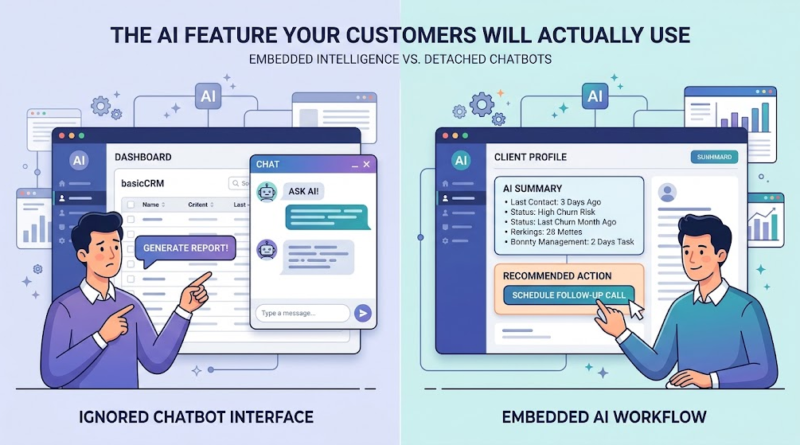
This story highlights a growing divide in software development. While conversational AI commands media attention, adding a chat interface isn’t always the best way to improve user experience. For many software products, the most valuable AI features in software products are not standalone chatbots, but rather subtle, context-aware assistance embedded directly into the user’s existing workflow.
This guide explores why high-profile AI demos often fail in practice, what workflow-embedded AI looks like, and how product leaders can build practical AI-powered product features that drive actual retention.
Why Customers Ignore AI Features That Look Impressive in Demos
Demos and daily operations demand different things from software. In a product demo, a prompt box that instantly answers a question looks innovative and interactive. But in daily work, opening a separate chat window, writing a well-structured prompt, waiting for a response, and pasting that output back into a task creates friction.
When software companies evaluate why certain AI features customers actually use succeed while others stall, several recurring challenges emerge:
-
Solving unanchored problems: AI functionality is often added to showcase tech capability rather than to address a severe user pain point. If users do not struggle with a task, automating or assisting it yields minimal value.
-
Workflow interruption (Context Switching): A chatbot forces users to pause their work, switch mentally to a prompt-driven interface, and articulate a request. If the manual task takes thirty seconds, prompting an AI assistant rarely saves meaningful time.
-
High verification costs: Generative AI models can produce plausible errors. If verifying an AI-generated draft requires as much effort as writing the text manually, the user gains little advantage.
-
Poor integration with operational data: A feature isolated from a product’s primary database or third-party integrations produces generalized output. To be useful, AI must understand the specific context of the record, account, or project being viewed.
-
Complexity over capability: Adding extra steps, configurations, or prompt engineering requirements to routine software operations increases cognitive load instead of reducing it.
It is worth noting that conversational AI is not inherently flawed. Chatbots excel in open-ended research, external customer support routing, and exploratory queries. However, expecting users to rely on a chat interface for structured, repetitive tasks inside enterprise software misjudges how people actually work.
The AI Feature That Fits Naturally Into Your Customers’ Workflow
The most effective AI features rarely demand center stage; they operate quietly within the user’s focus. Instead of forcing users to ask for help, embedded AI anticipates what the user is trying to accomplish and offers targeted assistance right where the action occurs.
This approach—context-aware AI assistance—embeds intelligence into existing forms, tables, buttons, and views.
+-------------------------------------------------------------------+
|                         TRADITIONAL CHATBOT                       |
|  User Leaves Task --> Writes Prompt --> Waits --> Verifies/Pastes |
+-------------------------------------------------------------------+
                                  vs.
+-------------------------------------------------------------------+
|                        EMBEDDED AI WORKFLOW                       |
|  User Stays in Task --> Sees Contextual Suggestion --> One Click   |
+-------------------------------------------------------------------+
Practical Examples of Embedded Intelligence
-
Contextual Summarization: Summarizing extensive support tickets, medical notes, or long contract threads directly at the top of a detail view.
-
Predictive Recommendations: Highlighting high-priority leads or flagging churn risks inside a account table based on recent usage trends.
-
Inline Draft Generation: Pre-filling reply fields, status updates, or routine documentation using existing metadata, requiring only a quick human review.
-
Anomaly and Error Detection: Scanning data entries in financial or inventory tools to flag out-of-range figures before submission.
-
Guided Next Actions: Offering single-click buttons for common follow-up steps within a task view.
A CRM Case Study: Embedded vs. Conversational AI
Consider a sales representative preparing for a call.
In a chatbot-centric CRM, the representative opens a chat drawer, types, “Summarize my last three interactions with Client X and tell me what to do next,” and waits for a response.
In a CRM built with embedded intelligence, the representative opens Client X’s profile. An AI-powered product feature automatically reads the recent emails and call transcripts attached to the account, displays a three-bullet summary at the top of the screen, and highlights a recommended follow-up button: “Schedule Technical Scoping Call.”
The second model removes friction, requires zero prompt writing, and saves noticeable time on every account review. AI integration in SaaS products delivers real value when it minimizes effort and keeps users focused on their core responsibilities.
From Predictive Suggestions to Smart Automation: What Useful AI Looks Like
When planning AI product development, teams do not need to choose between basic static tools and complete autonomy. Useful AI operates across a spectrum of capability.
+-----------------------------------------------------------------------+
|  1. ASSIST       -->   2. RECOMMEND       -->   3. AUTOMATE         |
|  Summarize/Draft       Suggest Next Step        Execute Within Bounds |
|  (User does work)      (User decides)           (User oversees)       |
+-----------------------------------------------------------------------+
The Three-Tier AI Framework
-
Assist (Lightweight Friction Reduction): The system cleans, formats, extracts, or summarizes information. The human initiates and completes the task; the AI speeds up processing time.
-
Recommend (Decision Support): The system analyzes context and suggests specific options or next steps. The human retains final approval before any action is executed.
-
Automate (Bounded Execution): The system performs repetitive actions automatically under predefined rules. Humans monitor outcomes and handle exceptions or flagged edge cases.
Skipping straight to full automation without passing through assistance and recommendation often undermines user trust, particularly when handling sensitive customer data or high-stakes business operations.
Progression Example: Customer Support Platform
To see how this framework applies to software product design, consider a customer support ticket system:
-
Stage 1 (Assist): When an agent opens an incoming ticket, the AI generates a brief summary of the customer’s previous tickets and extracts key metadata (e.g., order numbers, error codes).
-
Stage 2 (Recommend): The platform analyzes the ticket content and suggests a pre-drafted resolution response, along with recommended tagging for issue category. The agent reviews, edits if necessary, and sends.
-
Stage 3 (Automate): For low-risk, standardized requests (such as address updates or basic tracking requests), the system handles the inquiry automatically and notifies the agent only if the customer responds negatively or requests human help.
System reliability, clean data integration, robust privacy parameters, and clear user controls are required at every step. Actions that carry financial, legal, or relationship risks should maintain human oversight until accuracy and edge-case handling are thoroughly established.
How to Build AI Features People Actually Want to Use
Building AI features customers actually use requires disciplined product management focused on practical problem-solving.
Actionable Product Framework
  [1. Find Friction] ---> [2. Validate Problem] ---> [3. Narrow Use Case]
                                                                |
  [6. Test with Users] <-- [5. Design for Trust] <-- [4. Embed in Workflow]
          |
  [7. Iterate on Evidence]
-
Find the friction: Study user behaviour through session recordings, analytics, and interviews. Look for steps where users pause, re-enter data, or leave your application to consult secondary spreadsheets or documents.
-
Validate the problem: Confirm that customers care about resolving this friction. General curiosity about AI does not equal operational demand or willingness to adopt new workflows.
-
Start with one high-value use case: Identify a focused, measurable task where reducing completion time by 50% provides undeniable value.
-
Integrate AI into the existing workflow: Place suggestions, buttons, or summaries directly inside the screens users already visit daily. Avoid introducing extra navigation layers.
-
Design for trust and control: Make suggestions easy to edit or dismiss with a single click. Show the underlying context for AI output when clarity is necessary.
-
Test with real users: Roll out the feature to a limited user segment. Observe whether repeat usage holds up after the initial novelty wears off.
-
Improve based on evidence: Refine models and UI placements based on actual acceptance rates, edit frequency, and direct user feedback.
Illustrative Scenario: Project Management Software
Consider a project management platform whose team wants to implement AI automation for business workflows.
Rather than deploying a generic assistant that answers open questions about project status, the product team analyzes user data and identifies a specific bottleneck: project managers spend hours every Friday reviewing overdue tasks, messaging team members for updates, and re-drafting weekly progress reports.
The team implements an embedded feature: every Friday morning, the dashboard highlights blocked tasks, drafts a bulleted summary of progress based on completed sub-tasks, and prepares one-click update requests to send to assigned team members. The project manager simply reviews the generated summary, makes minor edits, and approves the updates.
Key Metrics for Evaluating Success
Tracking adoption requires looking beyond surface-level clicks. Product teams should evaluate a balanced mix of quantitative performance and trust indicators:
No single metric tells the full story. A high initial activation rate paired with a steep drop in repeat usage usually signals that a feature generates curiosity during onboarding but fails to deliver ongoing value in daily work.
Measure Adoption, Not Hype: Proving Your AI Feature Delivers Value
Determining whether an AI feature genuinely succeeds requires tracking real workflow outcomes rather than vanity metrics. Counts of raw AI queries or API calls indicate feature activity, but they do not prove that the software has made users more productive or satisfied.
To evaluate real impact, focus on operational efficiency, output quality, and customer retention.
Illustrative Measurement Example
Below is a simplified, hypothetical comparison showing how a product team might evaluate an embedded AI drafting assistant introduced to reduce support ticket resolution times:
Baseline (Manual Workflow):
- Target Task: Resolving complex tier-1 support tickets.
- Sample Size: 500 tickets over 30 days.
- Mean Resolution Time: 18 minutes per ticket.

Post-Launch (AI-Assisted Workflow):
- Target Task: Resolving complex tier-1 support tickets with embedded AI draft suggestions.
- Sample Size: 500 tickets over 30 days.
- Mean Resolution Time: 11 minutes per ticket.
- Suggestion Acceptance Rate: 74% accepted with minor or no edits.

Observed Variance:
- Time Saved: 7 minutes per ticket (approx. 38.8% reduction).
Note: The numbers above are illustrative and provided solely to demonstrate evaluation methodology.
Before attributing this time savings entirely to the AI feature, the product team must verify confounding variables:
-
Did average ticket complexity remain consistent across both periods?
-
Were support staff levels and experience comparable?
-
Did customer satisfaction scores (CSAT) hold steady or improve alongside faster resolution times?
Establishing clear baseline measurements, testing with balanced user cohorts, tracking qualitative feedback alongside operational logs, and monitoring computational expenses ensure that how to improve AI feature adoption remains grounded in measurable value.
Building AI Features That Earn Their Place
The true value of an AI feature is not determined by how sophisticated it looks in a sales demo, but by how quietly and reliably it fits into a customer’s daily routine. Software users do not open applications to interact with artificial intelligence; they open applications to finish tasks, resolve problems, and move on with their day.
By shifting focus away from standalone chat interfaces and toward context-aware, embedded assistance, SaaS founders and product leaders can build software that reduces friction, protects user attention, and drives long-term product adoption.
Build Practical AI Functionality with an Experienced Partner
If you are planning your product roadmap or looking to enhance your existing SaaS platform with practical AI capabilities, our software development team can help. We partner with founders, product managers, and enterprise leaders to identify high-value use cases, integrate robust AI models into existing software architectures, and build custom workflows that solve real business problems.
Contact our team today to discuss your software product goals, explore custom AI integration possibilities, or audit your current workflows for practical automation opportunities.
